Flagship SaaS

GBI Invoicing Digital invoicing built for real operations.

Professional digital invoicing software with customer, product, billing and FBR integration workflows.

✓ Guided invoice creation✓ FBR submission workflows✓ Customer & product records
GBI Invoicing dashboard and product demonstration
✦ Digital Invoicing
✓ FBR-ready workflow
SECURE ONLINE WORKSPACESMART INVOICE OPERATIONSFBR-ENABLED WORKFLOWSSCALABLE CLIENT MANAGEMENT
Product overview

From invoice preparation to FBR submission visibility.

GBI Invoicing brings operational invoice management into a structured workspace with clear status, customer and product records, billing awareness and digital invoice verification.
  • Professional invoicing
  • FBR digital invoicing workflows
  • Customer / party management
  • Product & service management
  • Payment and billing visibility
  • Secure online access
Explore all platform capabilities
GBI Invoicing dashboard with business overview
Everything in one workspace

Every essential invoicing workflow, thoughtfully connected.

GBI Invoicing brings everyday billing operations, user access and compliance-related tasks together in a secure, organised interface.

01Access & security

Secure Login & Account Protection

Role-based access, protected account sessions, password recovery and OTP / trusted-device options help teams access the right workspace securely.

Secure authenticationRole-aware access
02Overview & reporting

Financial Dashboard & Visibility

See invoice activity, financial summaries, customer and payment indicators, and actionable information in a clear, responsive dashboard.

At-a-glance indicatorsBusiness activity overview
03Core operations

Quick, Guided Invoice Creation

A structured invoice workflow brings customer selection, products, quantities, tax details and FBR-related information together with validation before submission.

Guided invoice stepsCustomer quick-add
04Invoice lifecycle

Invoice Management & Tracking

Organise invoices by their current state, review invoice details and identify records that still need attention. Generate professional invoice views for business records.

Invoice status visibilityOrganised invoice records
05FBR workflow

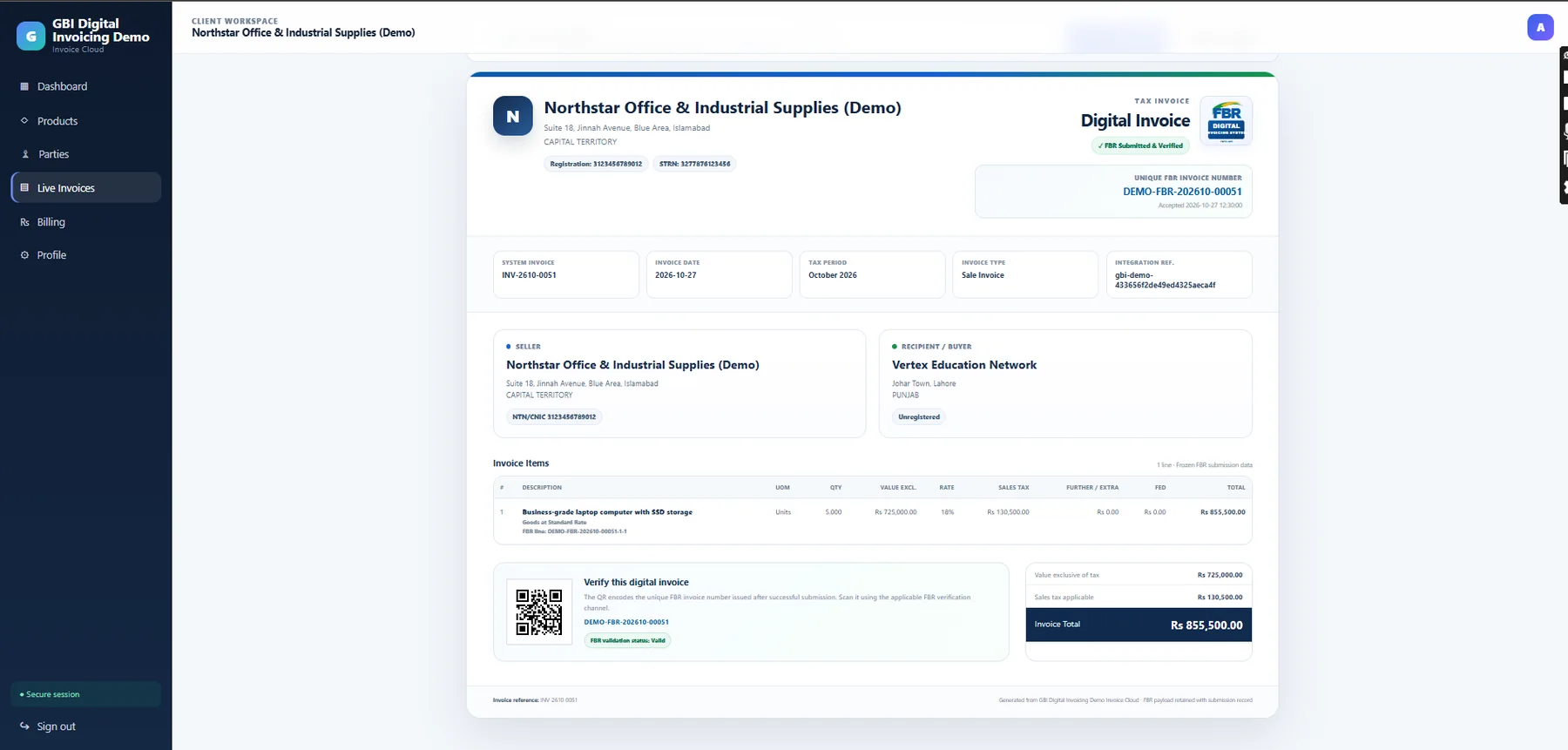
FBR-Verified Invoices with QR Codes

Where FBR integration is enabled and invoices are accepted, display available FBR verification details, reference information and QR codes on the invoice output.

FBR reference & statusQR-enabled verified output
06Contacts & parties

Customer & Party Management

Maintain customer details, addresses and registration information in one place for reuse across invoices. FBR-related validation helps keep party information consistent.

Central customer recordsRegistration details
07Catalogues

Products, Services & Tax Information

Create and manage reusable product or service entries, descriptions, units of measure, HS codes and applicable tax details for more consistent invoicing.

Product/service catalogueHS codes & UOM data
08Subscriptions

Clear Billing & Plan Management

View package details, billing cycles, due dates, payment status and available payment history in a dedicated, user-friendly billing area.

Monthly / yearly plansDue-date & payment visibility
09Customer assistance

Responsive Support Workspace

Raise and follow up on support requests within the platform, with a clear layout for updates and communications.

Support request trackingEasy issue follow-up
10Company identity

Business Profile & Invoice Branding

Manage business profile information and branding assets to present a consistent company identity across the applicable invoice layouts.

Company profile controlsBranded invoices
11Multi-client operations

Consultant & Multi-Client Management

Where authorised, consultants can manage associated client accounts while keeping separate client workspaces and access boundaries.

Client-specific workspacesAccess permissions
12Operational oversight

Activity & Action Transparency

Administrative activity records support visibility into actions, users and available device or session information for improved operational oversight.

Action historyAccount activity visibility
How it works

From customer selection to a professional digital invoice.

A practical journey that helps teams move from routine data entry to organised invoice records and, when enabled, FBR submission.

01

Set up your workspace

Configure your business profile, authorised users, customer records and product or service catalogue.

02

Prepare an invoice

Choose the customer, add items and verify applicable quantity, pricing, tax and registration details.

03

Submit when applicable

Use the configured FBR workflow to send eligible invoices and review the returned submission response.

04

Track & share records

View invoice statuses and generate the applicable professional invoice output, including verification details when available.

Actual product screens

A closer look at the live application experience.

These visuals are from the actual GBI Invoicing product interface.

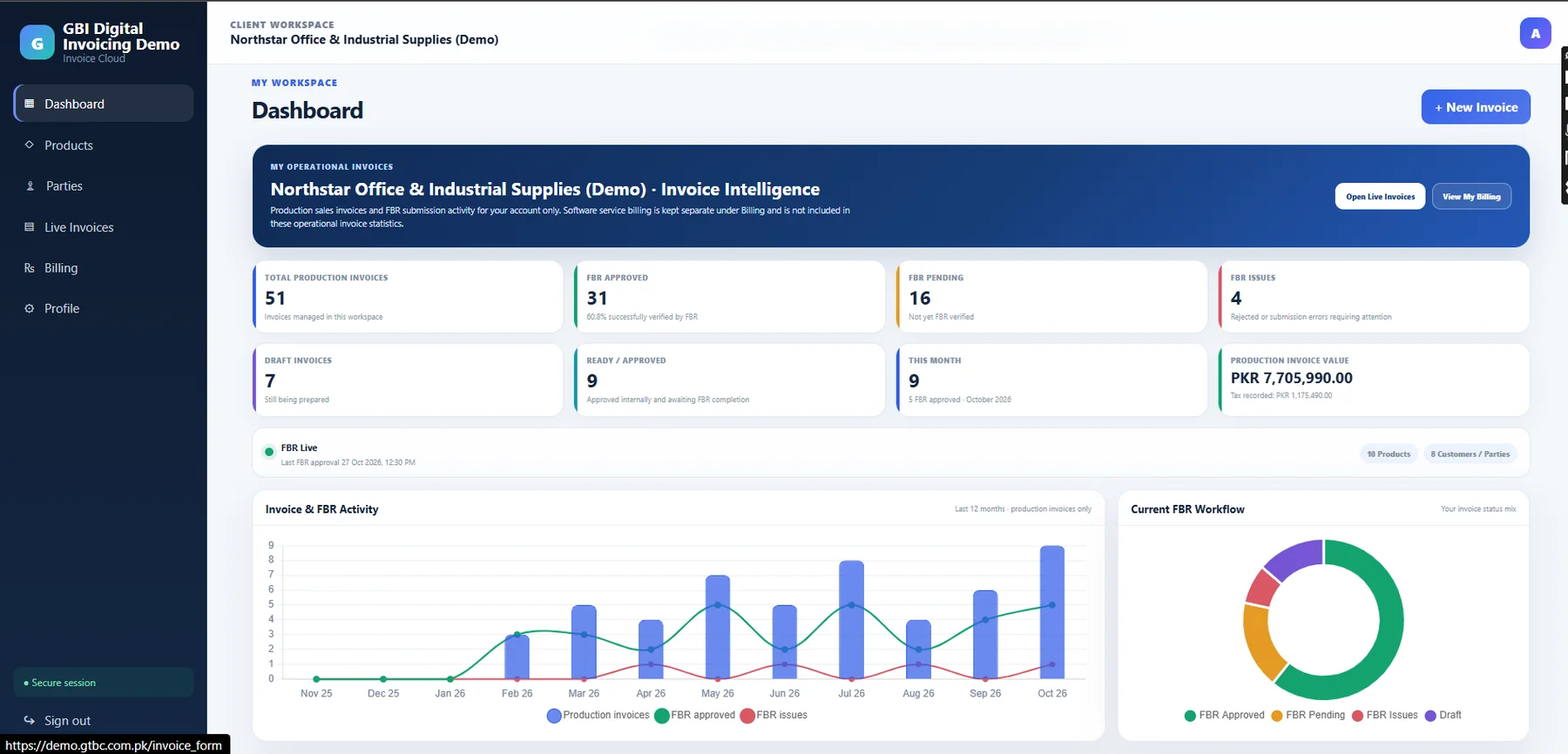
GBI Invoicing dashboard
Dashboard with operational invoice intelligence, FBR workflow visibility and management charts.
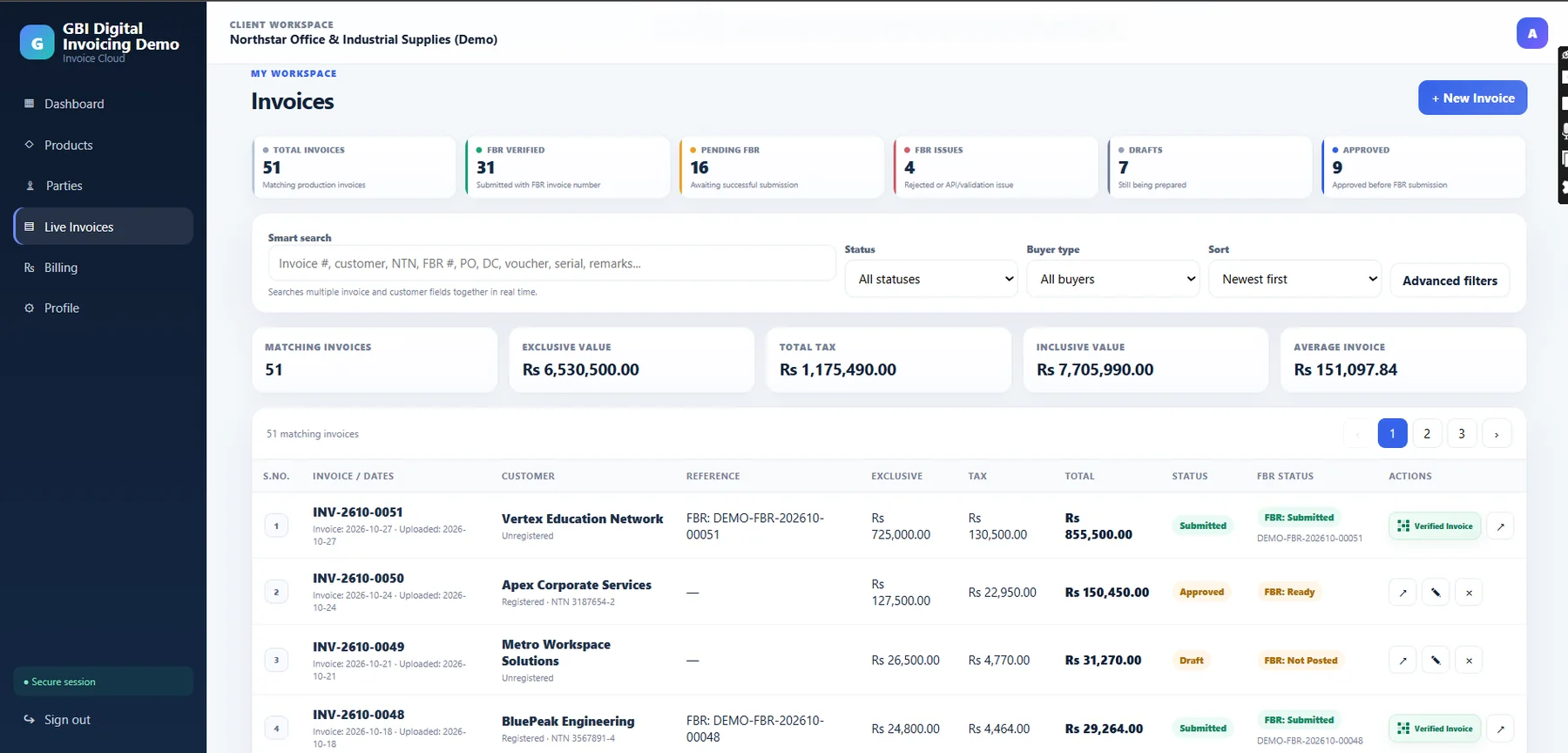
GBI Invoicing invoice list
Invoice management with smart search, status visibility and financial summaries.
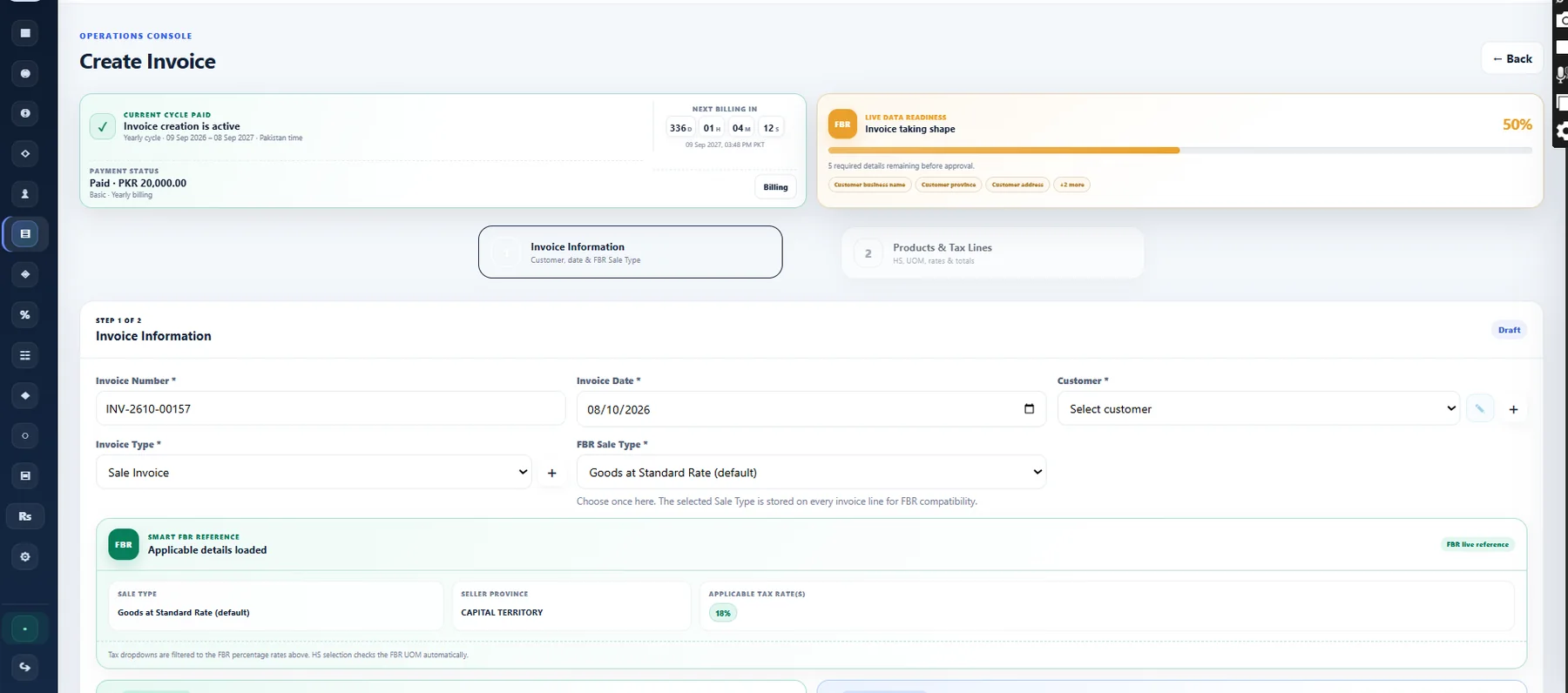
GBI Invoicing create invoice step one
Structured invoice creation with billing status and FBR data-readiness guidance.
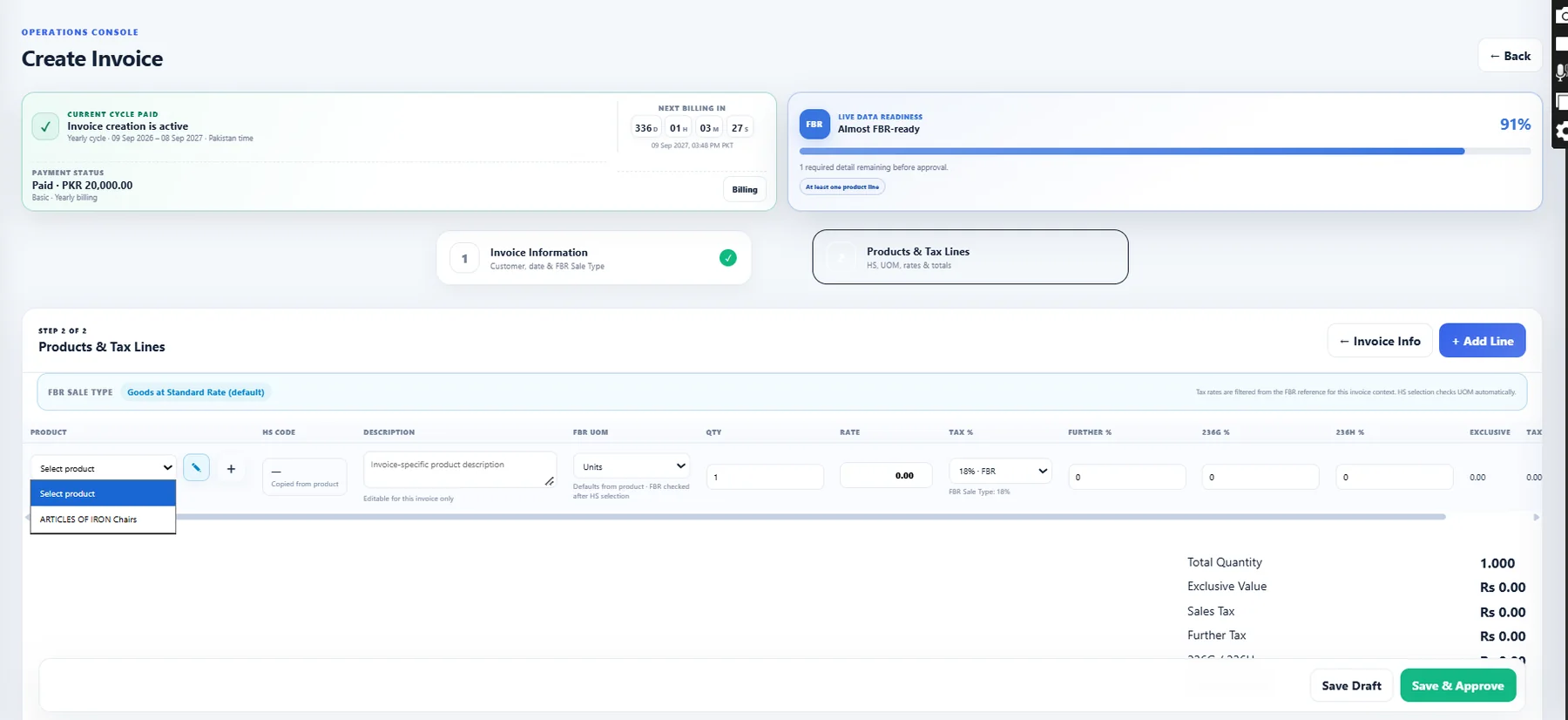
GBI Invoicing product and tax lines
Products, HS/UOM and tax-line workflow designed around digital invoice requirements.
GBI Invoicing verified digital invoice
Professional digital invoice view with FBR reference and QR verification information.
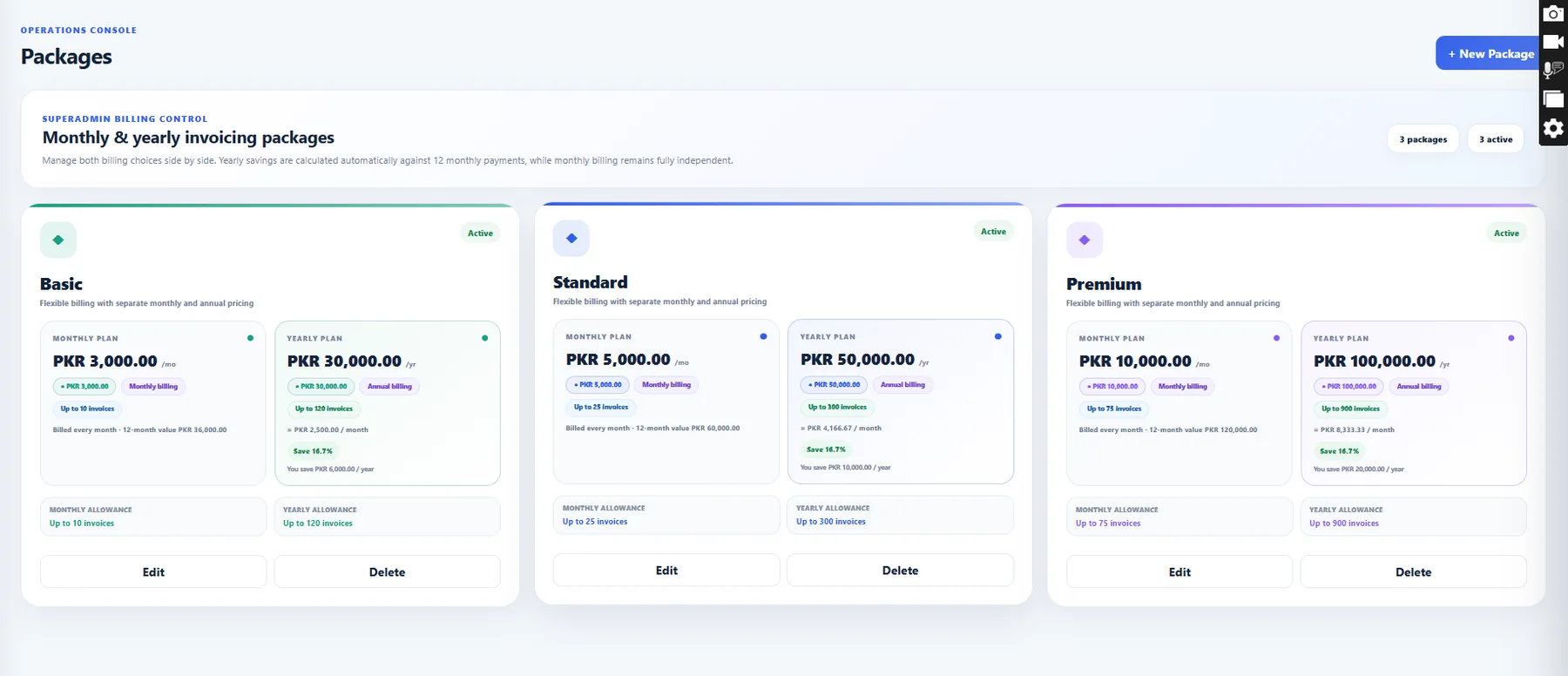
GBI Invoicing packages
Flexible monthly and yearly package administration in the invoicing platform.
FBR integration

Designed around digital invoice submission and verification workflows.

The platform supports operational preparation, reference data, submission states and verified invoice presentation. Regulatory claims should always be assessed against the business’s own registration and applicable FBR requirements.

1

Prepare

Build invoices using structured customer, product, tax and applicable FBR reference information.

2

Submit & Track

Submit eligible records through the configured FBR workflow and inspect the returned status or validation message.

3

Verify

Present accepted invoices with available FBR identifiers, verification information and QR-enabled output.

FBR functions depend on the client’s FBR configuration, registration status, valid integration credentials and current FBR requirements. Non-FBR invoicing can be managed where enabled for a client.

Why businesses choose GBI Invoicing

Less fragmented work. More operational confidence.

Give teams a consistent place to manage the details behind every invoice, without losing sight of customers, products, payment status or verification information.

Discuss your invoicing needs →
01Reduce repeated entryReuse customer and product records throughout recurring invoicing activities.
02Improve operational clarityKeep invoice activity, billing status and customer information easier to review.
03Stay organised as teams growUse account roles and client-specific access to support more structured collaboration.
04Present invoices professionallyCombine company branding with clear invoices and relevant verification information.
Pricing

Choose the invoice allowance that fits your business.

Commercial values are retrieved directly from the active package records in GBI Invoicing.

Basic

For smaller invoice volumes
PKR 3,000 / month
  • Up to 10 invoices / month
  • Full core invoicing workspace
  • Customer and product management
  • Invoice history and status visibility
  • FBR digital invoicing workflows
Get Started

Premium

For higher invoice volumes
PKR 10,000 / month
  • Up to 75 invoices / month
  • Full core invoicing workspace
  • Customer and product management
  • Invoice history and status visibility
  • FBR digital invoicing workflows
Get Started
Product FAQs

Questions about GBI Invoicing.

GBI Invoicing is the flagship digital invoicing SaaS product from GB Innovators. It provides an online workspace for invoice operations, customer and product management, billing visibility and supported FBR digital invoicing workflows.
The corporate website retrieves active commercial package values from the GBI Invoicing package source instead of maintaining a second pricing list.
The platform includes FBR-related invoice preparation, submission-state and verified-invoice workflows. A business remains responsible for its own registration, data accuracy and applicable regulatory requirements.
The corporate site links securely to the separate GBI Invoicing application at invoicing.gbinnovators.com. The two applications remain technically separated.

Ready to see GBI Invoicing in action?

Tell us about your invoicing workflow and we can help you evaluate the right plan and setup.

Request a Demo →